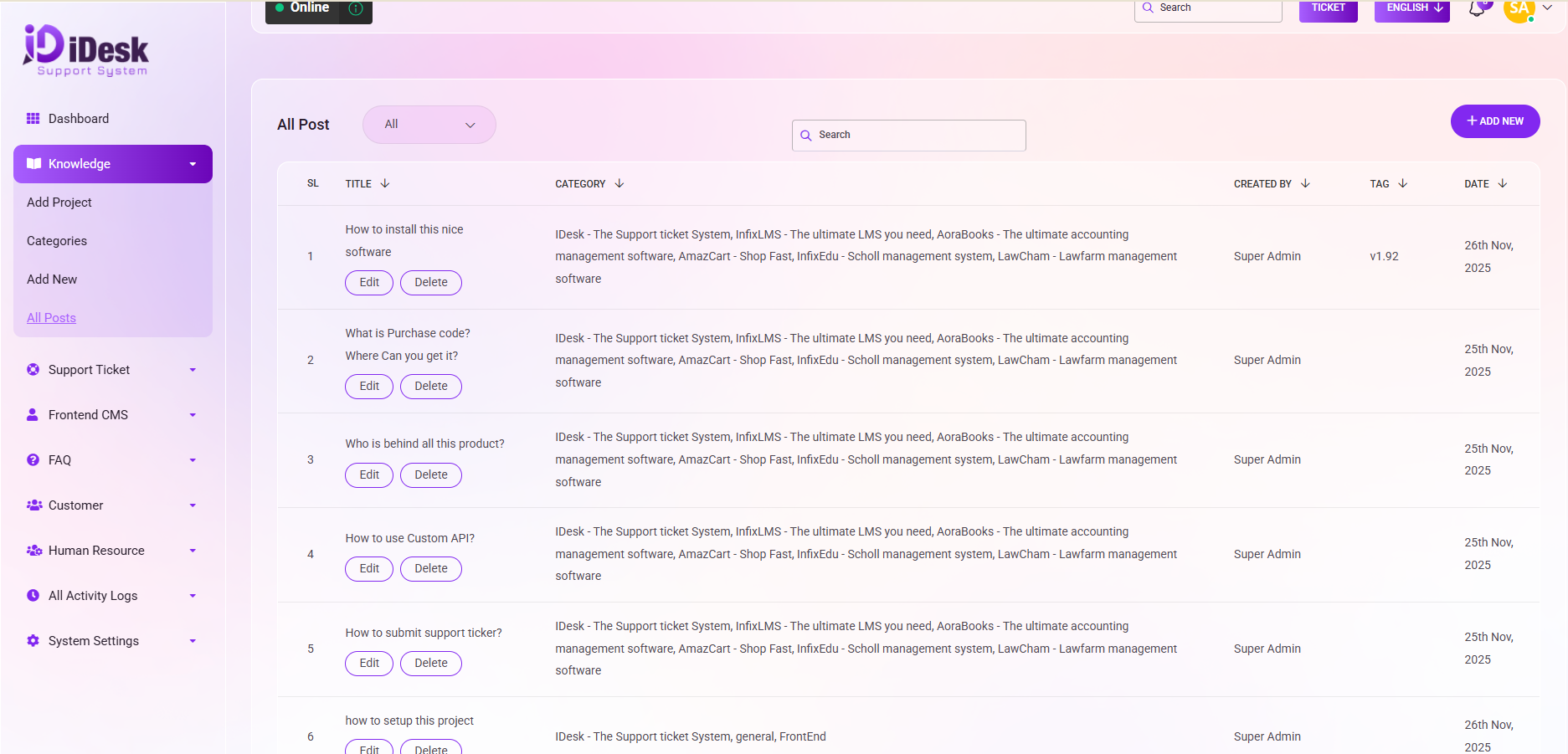
All Post
The "All Posts" option serves as a comprehensive view of all knowledge posts, presenting a detailed list. Such as:
SL: You can see the serial number of the post.
Title: You can see the title of the post.
Category: You can see the category name of the post.
Created By: You can see who created the post.
Tag: From here you can see the tag of the post.
Date: You can see the date when the post is published.
Overview:
List Display: Access a list of all posts showcasing essential details.
Filtering Options:
Project Selection: By clicking on "All" in the dropdown menu, users can filter posts by Project name.
Search Functionality: Utilize the search option in the upper middle of the website for specific searches.
Quick Actions:
Shortcut for New Knowledge: On the right side, find a shortcut key for quickly adding new knowledge posts.
Editing and Deleting: Beneath the title menu, discover dedicated buttons for EDIT and DELETE, facilitating seamless content management.
Navigation Convenience:
Numeric Navigation: At the bottom, numeric navigation buttons are available for effortless movement through the posts.
This user-friendly interface not only provides a comprehensive overview of all knowledge posts but also offers convenient tools for efficient content management and navigation.