Bank payments are the digital equivalent of paper checks. Customers can use bank payments to pay for products and services online. Bill pay services are usually a free feature of bank accounts, typically checking accounts. After enrolling and providing your bank with your bill provider's information, your bank will pay your bills on time, deducting the bill payment from the funds in your account.
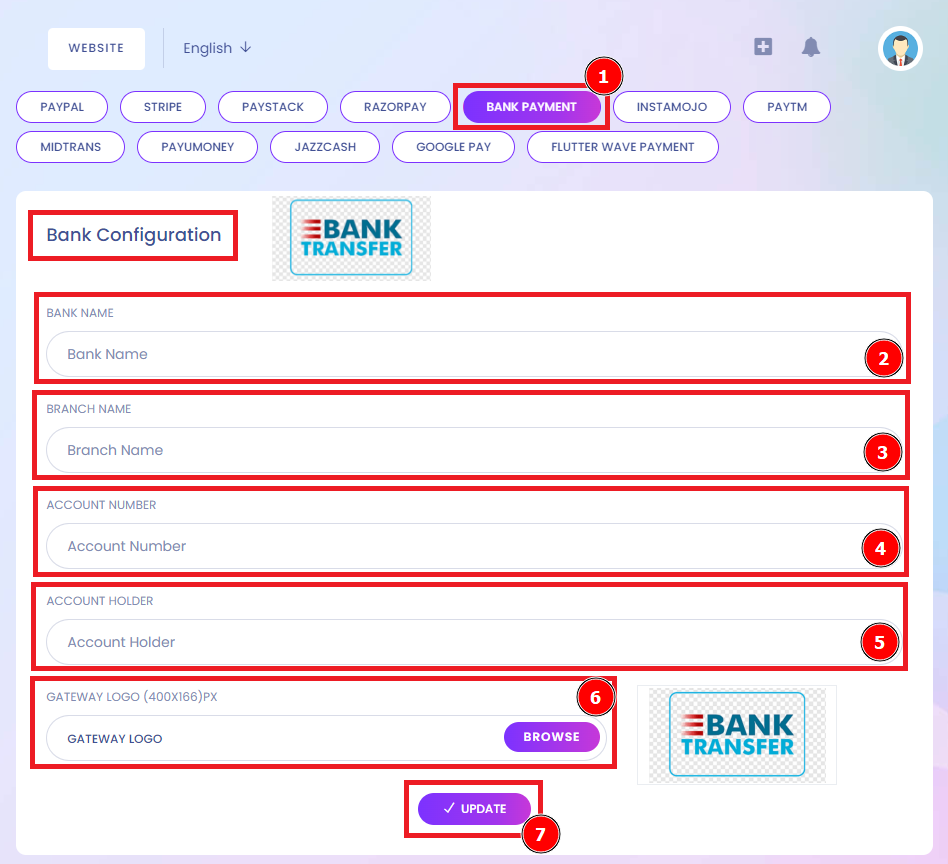
Short Direction: {Amazcart> Dashboard> Payment Gateways> Bank Payment> Bank Name> Branch Name> Account Number> Account Holder> Gateway Logo> Update.}
If you want to transfer a Bank payment, then you have to fill in the Bank Name, Branch Name, Account Number, and Account Holder. Click the Browser to select the gateway logo to be relatable for your trace & don’t forget to Update it.
1- Bank Payment
2- Bank Name
3- Branch Name
4- Account Number
5- Account Holder
6- Gateway Logo
7- Update it.