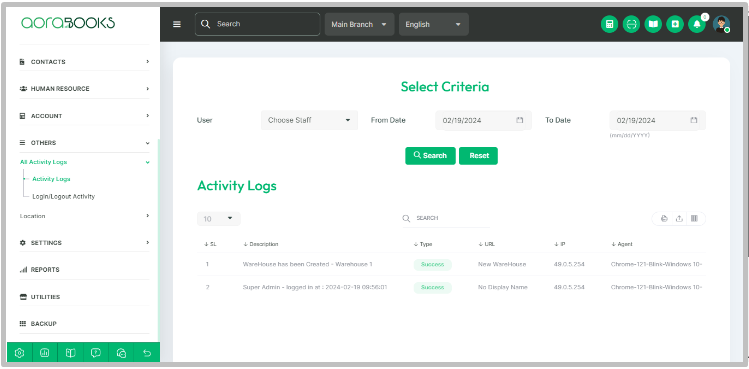
Welcome to Aorabooks! The activity log feature helps you keep track of all activities within the system. This guide will show you how to access and search the activity logs effectively.
Accessing Activity Logs:
- Navigate to the "Others" Module:
- To begin, locate the "Others" module in the sidebar menu of the software interface.
- Select "Activity Logs":
- Within the "Others" module, click on "Activity Logs" to access the activity log section.
- Viewing Activity Logs:
- Once in the activity logs section, you will see a comprehensive list of all activities recorded within the system. This log provides insights into user actions and system events.
Searching Activity Logs:
- Utilize the Search Function:
- If you need to find specific activities or events, use the search functionality provided within the activity logs section. Enter relevant keywords or filters to refine your search results.
Understanding Activity Log Entries:
- Timestamps:
- Each activity log entry is timestamped to indicate when the activity occurred. This helps you track events in chronological order.
- Activity Details:
- The activity log entries include details about the specific actions taken within the system. This may include user actions, system updates, or other relevant activities.
Analyzing Activity Logs:
- Monitoring User Activities:
- Use the activity logs to monitor user interactions with the software. This can assist in ensuring compliance with company policies and identifying any unusual behavior.
- Tracking System Changes:
- Keep track of system updates and changes recorded in the activity logs. This promotes transparency and accountability within the organization.
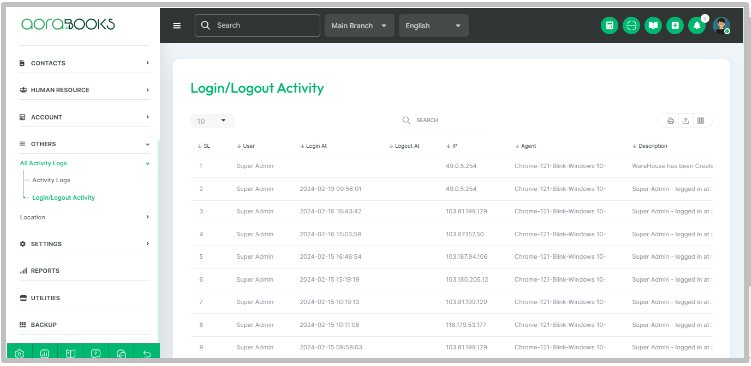
Login/logout activity:
Login/logout activity shows the list of login and logout information of the system users.
If you need further assistance or have any inquiries, please refer to the Help section within the Aorabooks interface or contact our customer support team at https://ticket.aorasoft.com/.
Thank you for choosing Aorabooks. We're here to support you!