Quotations: Understanding and Managing
What is a Quotation?
A sales quotation is a formal document that outlines the costs associated with a product or service offered to a potential client. It serves as an initial proposal, detailing pricing and terms to help the client make an informed decision.
Creating a Quotation:
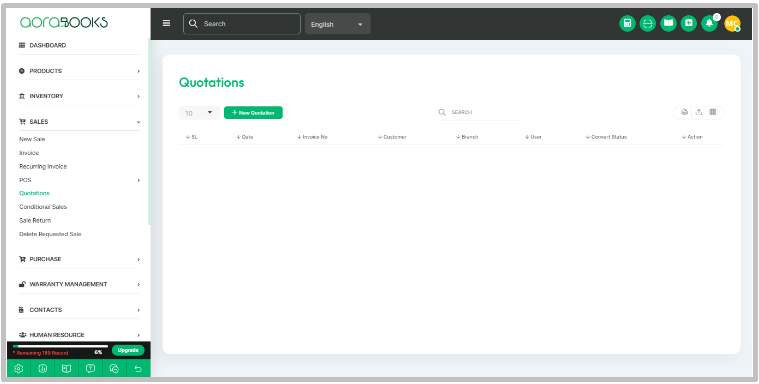
- Navigate to the Sales module within the software interface.
- Locate and select the"Quotation" option.
- Click on the"New Quotation" button to initiate the creation process.
- Fill in the necessary details such as product descriptions, quantities, prices, and any relevant terms or conditions.
- Once all details are entered, save the quotation.
Viewing Quotations:
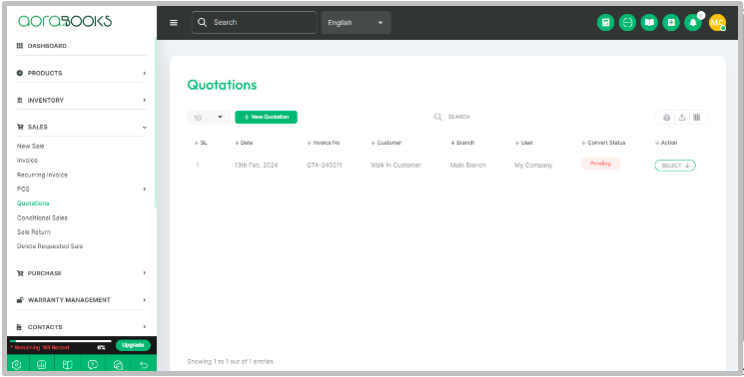
After saving, the created quotation will be accessible within the Quotation list.
Navigate to the Quotation list within the Sales module to view all saved quotations.
Editing and Deleting Quotations:
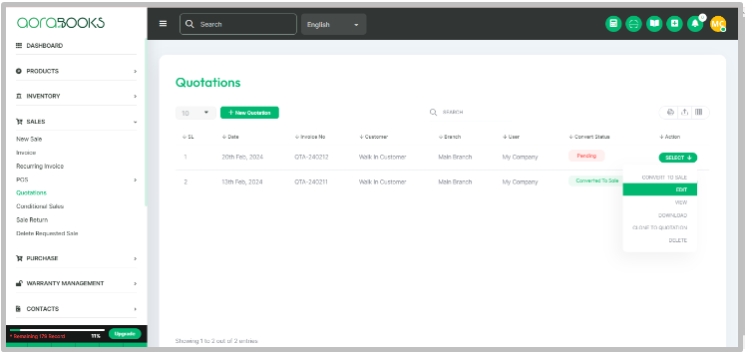
- Within the Quotation list, locate the specific quotation you wish to edit or delete.
- Select the respective quotation and choose the appropriate action from the available options.
- To edit, select the"Edit" option and make the necessary changes. Save the modifications.
- To delete, select the"Delete" option. Confirm the deletion when prompted.
By following these steps, users can effectively create, view, edit, and delete quotations within our software interface. Quotations play a crucial role in initiating client engagements and securing business opportunities, ensuring transparency and clarity in pricing and terms.
For further assistance or inquiries, please consult the Help section within Aorabooks or contact our dedicated customer support team at https://ticket.aorasoft.com/
Thank you for choosing Aorabooks!